> For the complete documentation index, see [llms.txt](https://docs.9proxy.com/llms.txt). Markdown versions of documentation pages are available by appending `.md` to page URLs; this page is available as [Markdown](https://docs.9proxy.com/getting-started/residential-proxy-by-ips/for-macos-windows/port-configuration.md).
# Port Configuration
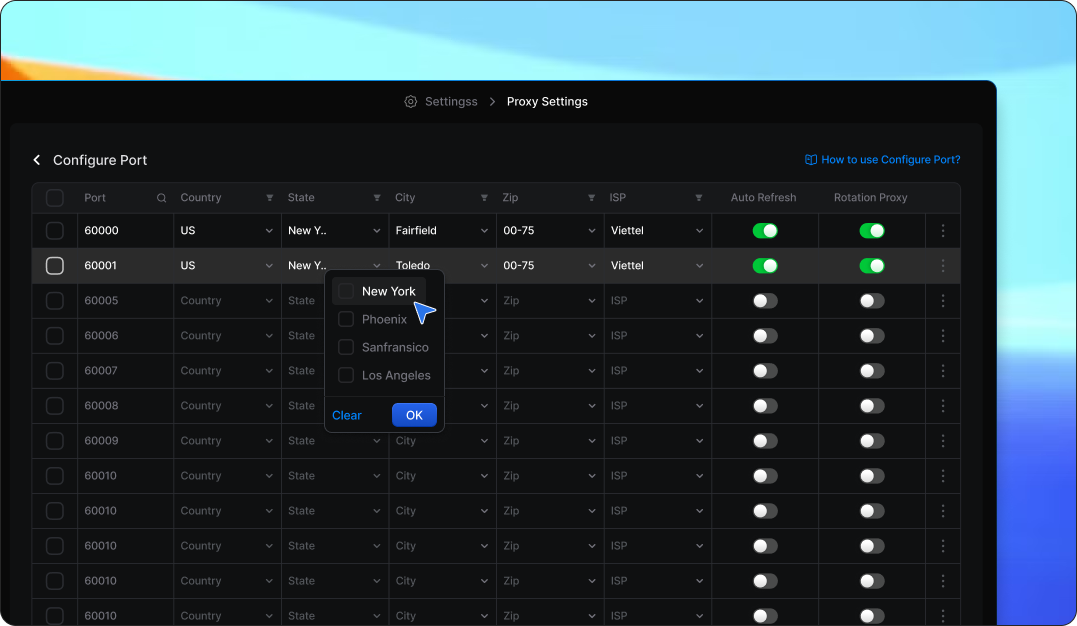
The **Port Configuration** feature allows you to customize individual ports based on your specific requirements. Once you define specific criteria for a port, it will prioritize using proxies that match those settings. This provides greater control over your connections and enhances efficiency.
## 1. Key Benefits Of Port Configuration
* Greater control over proxy selection based on location and ISP.
* Optimized performance by ensuring ports always use preferred proxies.
* Enhanced automation with customizable auto-refresh and rotation settings.
## 2. How To Configure a Port
Follow these steps to set up and customize your ports:
{% stepper %}
{% step %}
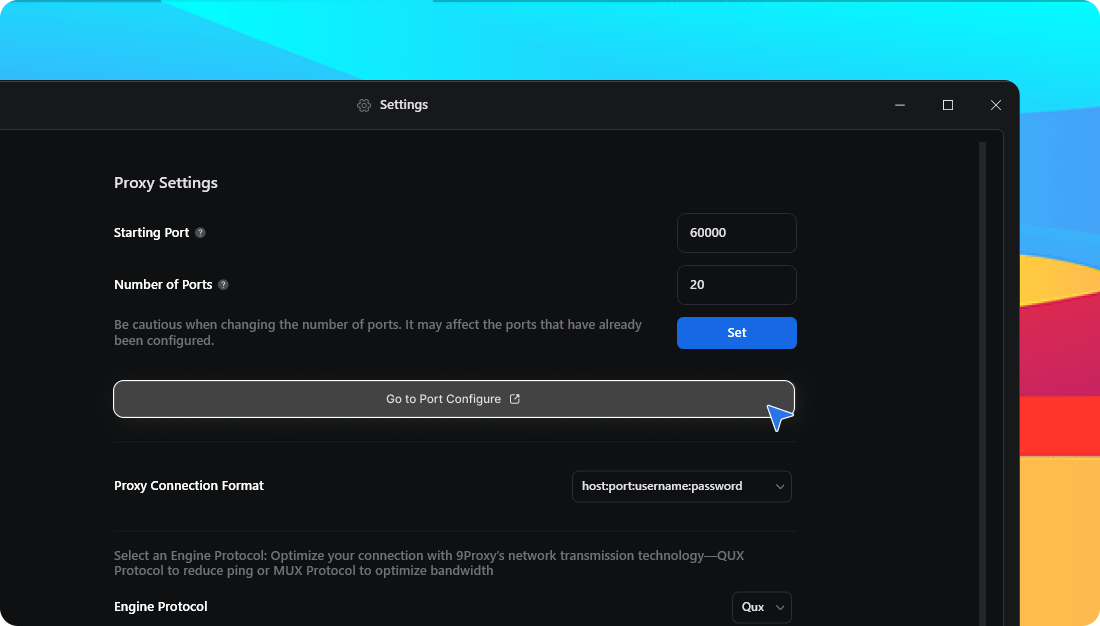
Open the **9Proxy App** > Go to **Settings** > **Proxy Settings** > Go to **Port Configuration**
{% endstep %}
{% step %}
Select the port you want to configure
{% endstep %}
{% step %}
Set custom criteria to filter proxies, including `Country, City, State, ZIP Code, Internet Service Provider (ISP)`
{% endstep %}
{% step %}
Enable or disable additional features as needed
* [**Auto Refresh Proxy**](/getting-started/residential-proxy-by-ips/for-macos-windows/auto-refresh-proxy.md): Automatically replaces offline proxies to keep the port active.
* [**Auto Rotation Proxy**](/getting-started/residential-proxy-by-ips/for-macos-windows/auto-rotation-proxy.md): Rotates IPs at a set interval to maintain fresh connections.
{% endstep %}
{% step %}
**Save** your settings to apply the configuration to the selected port
{% endstep %}
{% endstepper %}
{% columns %}
{% column %}
#### Support Channels:
{% endcolumn %}
{% column %}
* **Email**:
* **Live Chat**: Available on[ 9proxy.com](https://9proxy.com)
* **Telegram**: @Official9Proxy
{% endcolumn %}
{% endcolumns %}
---
# Agent Instructions
This documentation is published with GitBook. GitBook is the documentation platform designed so that both humans and AI agents can read, navigate, and reason over technical content effectively. Learn more at gitbook.com.
## Querying This Documentation
If you need additional information that is not directly available in this page, you can query the documentation dynamically by asking a question.
Perform an HTTP GET request on the current page URL with the `ask` query parameter, and the optional `goal` query parameter:
```
GET https://docs.9proxy.com/getting-started/residential-proxy-by-ips/for-macos-windows/port-configuration.md?ask=&goal=
```
`ask` is the immediate question: it should be specific, self-contained, and written in natural language.
`goal` is optional and describes the broader end goal you are ultimately trying to accomplish on behalf of the user. GitBook uses it to tailor the answer towards what is most useful for that goal.
The response will contain a direct answer to the question and relevant excerpts and sources from the documentation.
Use this mechanism when the answer is not explicitly present in the current page, you need clarification or additional context, or you want to retrieve related documentation sections.