> For the complete documentation index, see [llms.txt](https://docs.9proxy.com/llms.txt). Markdown versions of documentation pages are available by appending `.md` to page URLs; this page is available as [Markdown](https://docs.9proxy.com/integrations/gb-based-residential-proxies/proxy-managers/proxifier.md).
# Proxifier
**Proxifier** is a powerful tool that allows any application, even those without built-in proxy support, to connect through a proxy server. This guide will walk you through integrating 9Proxy Residential Proxies with **Proxifier** for seamless, app-level proxy usage.
{% stepper %}
{% step %}
### Download and Install Proxifier
Download **Proxifier** from the [official website](https://www.proxifier.com/).
You can use the 31-day free trial, and on Windows, a portable version is also available.
{% hint style="info" %}
Before setup, disable any active VPN, system proxy, or app-level proxy to avoid routing conflicts.
{% endhint %}
{% endstep %}
{% step %}
### Add Your Proxy
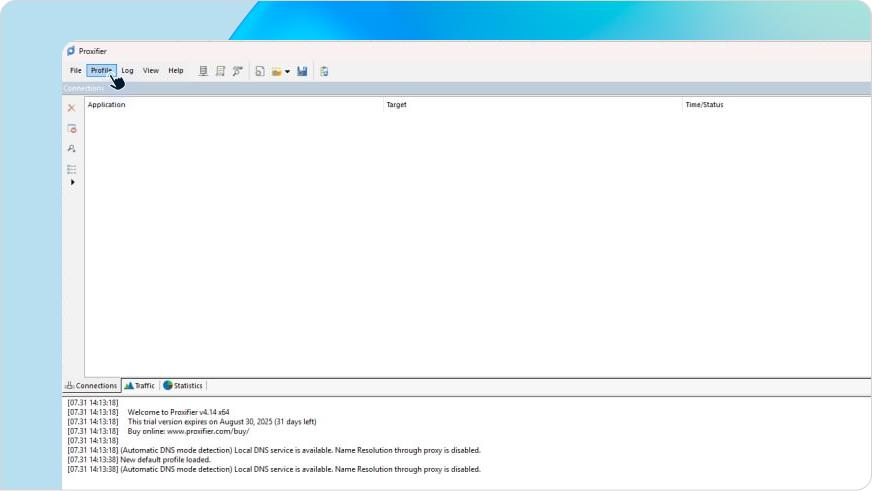
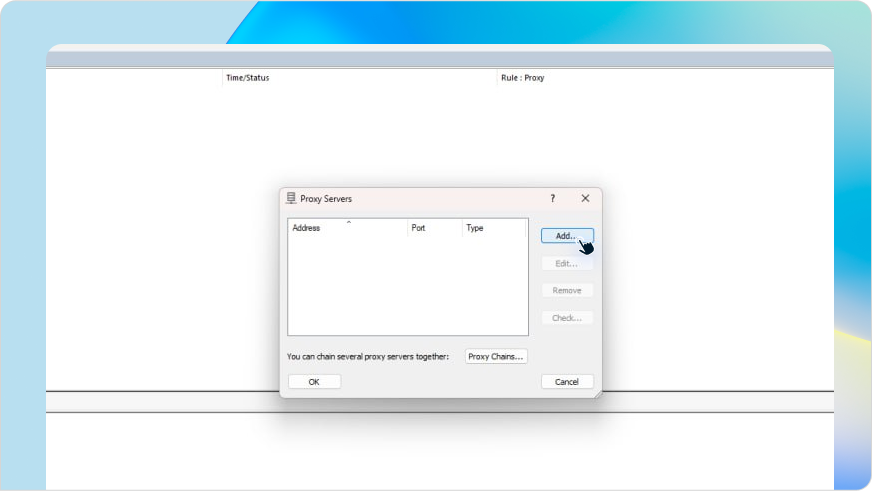
* In **Proxifier**, go to **Profile** > **Proxy Servers**
* Click **Add** to set up a new proxy server
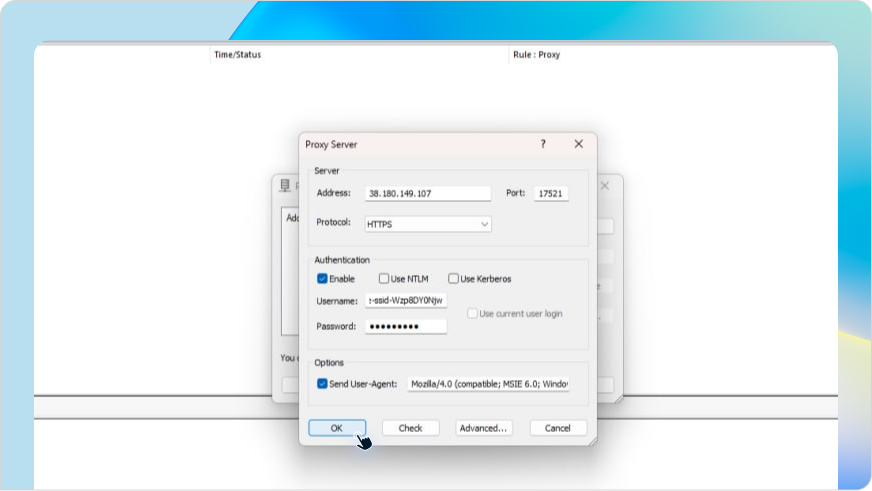
* Enter the following details:
| Field | What to Enter |
| ----- | ------------------------------------- |
| Host | Your 9Proxy IP (e.g., 38.180.149.107) |
| Port | Your proxy port (e.g., 17521) |
| Type | Select either HTTPS or SOCKS5 |
{% hint style="info" %}
### NOTE
If you haven’t created a sub-user or generated a proxy yet, please create one [here](https://9proxy.com/dashboard/residential-proxy-gb?tab=get-proxy) before proceeding.
{% endhint %}
{% endstep %}
{% step %}
### Authenticate with Your Proxy Credentials
* Check Enable Authentication
* Enter the credentials for your sub-account:
* **Username**: Structured 9Proxy username (see format below)
* **Password**: Your 9Proxy sub-account password
#### Username Format:
{% code overflow="wrap" %}
```
-country--st--city--isp--ssid--sst-
```
{% endcode %}
#### Example:
* **Host**: 38.180.149.107
* **Port**: 17521
* **Username**: useruser123-country-US-ssid-rhdN1907ma
* **Password**: X12345678
{% hint style="info" %}
The username includes your proxy targeting settings like country, session ID, etc. For help creating your custom proxy username, refer to [this guide](https://docs.9proxy.com/getting-started/residential-proxy-by-gb/making-requests).
{% endhint %}
{% endstep %}
{% step %}
### Route a Specific App Through Proxy
* Go to **Profile** > **Proxification Rules**
* Click **Add** to create a new rule
* In the Application field, browse and select your desired .exe file
* Set Action to your newly added proxy
* (Optional) Reorder the rules for priority execution
{% endstep %}
{% endstepper %}
## You're All Set!
**Proxifier** will now tunnel your selected application’s Internet traffic through 9Proxy , giving you powerful targeting and anonymity without needing native proxy support.
Need help? Our support team is here to assist you 24/7!
---
# Agent Instructions
This documentation is published with GitBook. GitBook is the documentation platform designed so that both humans and AI agents can read, navigate, and reason over technical content effectively. Learn more at gitbook.com.
## Querying This Documentation
If you need additional information that is not directly available in this page, you can query the documentation dynamically by asking a question.
Perform an HTTP GET request on the current page URL with the `ask` query parameter, and the optional `goal` query parameter:
```
GET https://docs.9proxy.com/integrations/gb-based-residential-proxies/proxy-managers/proxifier.md?ask=&goal=
```
`ask` is the immediate question: it should be specific, self-contained, and written in natural language.
`goal` is optional and describes the broader end goal you are ultimately trying to accomplish on behalf of the user. GitBook uses it to tailor the answer towards what is most useful for that goal.
The response will contain a direct answer to the question and relevant excerpts and sources from the documentation.
Use this mechanism when the answer is not explicitly present in the current page, you need clarification or additional context, or you want to retrieve related documentation sections.